Norton AntiVirus Plus explained: what the entry-level tier really includes
How this article is funded
zlatenis.online is an independent, advertising-funded publication. This article contains partner links to Norton AntiVirus Plus. If you buy after following one, the retailer pays us a commission. You pay no more than you otherwise would, and the commission does not change what we write — see our editorial policy and affiliate disclosure. We are not Norton and we do not sell, support or supply the product.
Norton AntiVirus Plus is the cheapest product in the Norton consumer range, and it is also the one most often bought under a misunderstanding. A great deal of the marketing around “Norton” describes a VPN, dark-web monitoring and parental controls. Those belong to the Norton 360 tiers. This article sets out what the entry-level tier actually contains, how the underlying detection works, and how to tell whether it is the right size of product for you.
A note on accuracy
Feature lists, device counts, storage allowances and prices for consumer security software change frequently and differ between countries. Everything below describes the product as the vendor documented it at the time of writing. Where anything here diverges from the vendor’s own current product pages or licence terms, the vendor’s information prevails. Check before you buy, and tell us if you find something out of date — our corrections procedure is public.
What Norton AntiVirus Plus is
Norton AntiVirus Plus is a subscription security product for one Windows PC or one Mac. Its core is a real-time malware engine that inspects files as they arrive and as they run. Around that core the tier adds a firewall, a password manager and, on Windows, an allowance of cloud backup storage. Norton also attaches its “Virus Protection Promise” to the tier — a support-and-refund commitment whose exact terms are set out in the subscription agreement and vary by region.
That is the whole of it. It is a competent, conventional antivirus product with a couple of useful extras. It is not a privacy suite, and it is not an identity-protection service.
Where it sits in the Norton range
The single most common purchasing mistake is buying AntiVirus Plus expecting the VPN. Norton Secure VPN is bundled with the Norton 360 tiers; it is not part of AntiVirus Plus. The same is true of dark-web monitoring, which appears in the Norton 360 tiers in the countries where Norton offers it, and of parental controls, which are a Norton 360 Deluxe feature.
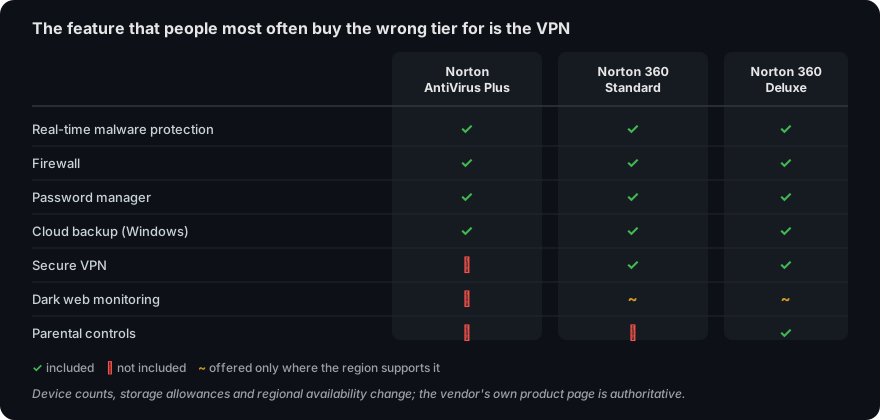
If the VPN is the thing you actually want, buying AntiVirus Plus and adding a separate VPN subscription later is usually more expensive than starting one tier higher. It is worth working out which features you will genuinely use before choosing, rather than after.
Partner link. If you buy after following it we earn a commission from the retailer. It costs you nothing extra and does not change the price you are shown.
How detection actually works
“Antivirus” is a historical name. No mainstream product today relies on a single technique; each runs several in parallel, because each one fails in a different way.
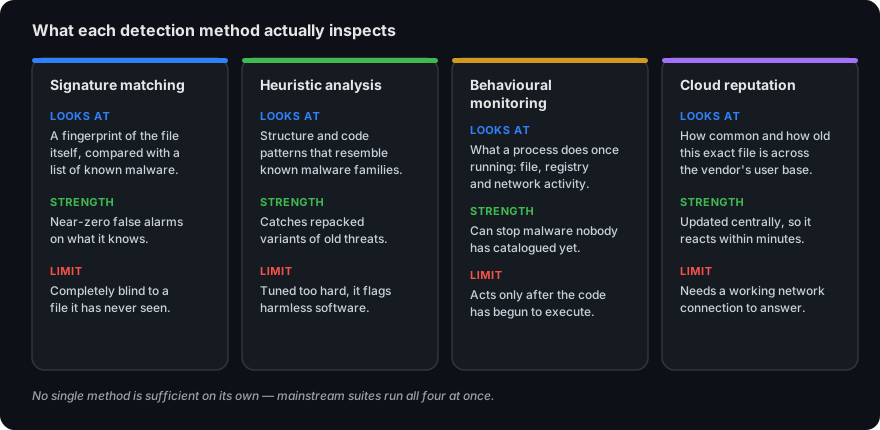
Signature matching compares a file against fingerprints of known malware. It is precise and produces very few false alarms, and it is completely blind to anything it has not already catalogued. Heuristic analysis looks for structural patterns typical of a malware family, which catches repackaged variants of old threats but can also flag legitimate software — installers, system utilities and developer tools are the usual casualties.
Behavioural monitoring ignores what a file is and watches what it does: a process that starts enumerating documents and rewriting them in place is behaving like ransomware regardless of whether anyone has seen it before. This is the layer that can stop genuinely novel attacks, and its inherent limitation is that it only acts once the code has started running. Cloud reputation asks the vendor’s servers how old and how common a particular file is across its whole user base; a binary first seen twenty minutes ago on four machines worldwide is treated very differently from one that has been installed a million times over three years.
Why the cloud lookup matters — and what happens offline
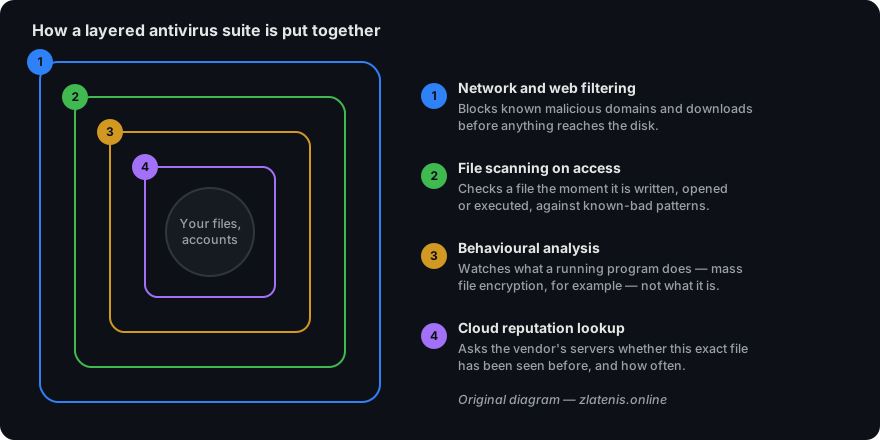
Older antivirus products shipped large definition files that had to be downloaded on a schedule. Modern products still maintain a local definition set, but they lean heavily on a live lookup: when the local engine meets a file it does not recognise, it sends a hash — a short fingerprint, not the file itself — to the vendor and gets a verdict back in a fraction of a second. That is how a product can react to a new campaign within minutes rather than waiting for the next definition push.
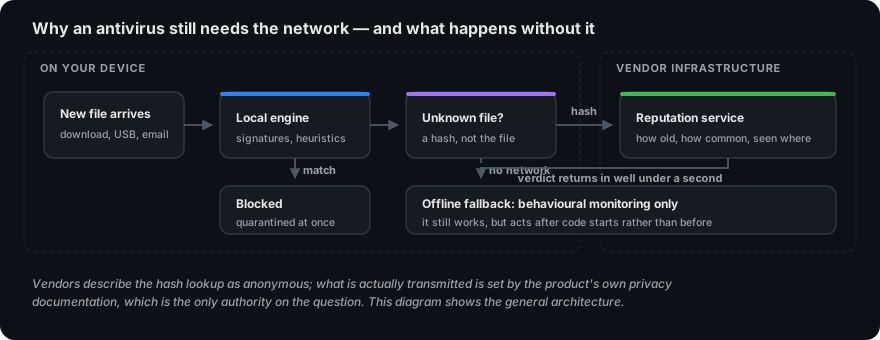
It is worth being clear about the trade-off rather than presenting it as pure upside. The lookup means the product is talking to the vendor about files on your machine, under the terms of the vendor’s privacy policy. It also means that protection is measurably weaker on a machine with no network connection: the local engine and behavioural monitoring keep working, but the fastest-moving layer is unavailable.
The threat it is most likely to meet: phishing
For an ordinary home user, the realistic risk is not an exotic exploit. It is a convincing message. Security software helps here mainly through web filtering — blocking known fraudulent domains before the page loads — but filtering is always chasing new domains, and the last line of defence is recognising the message for what it is.
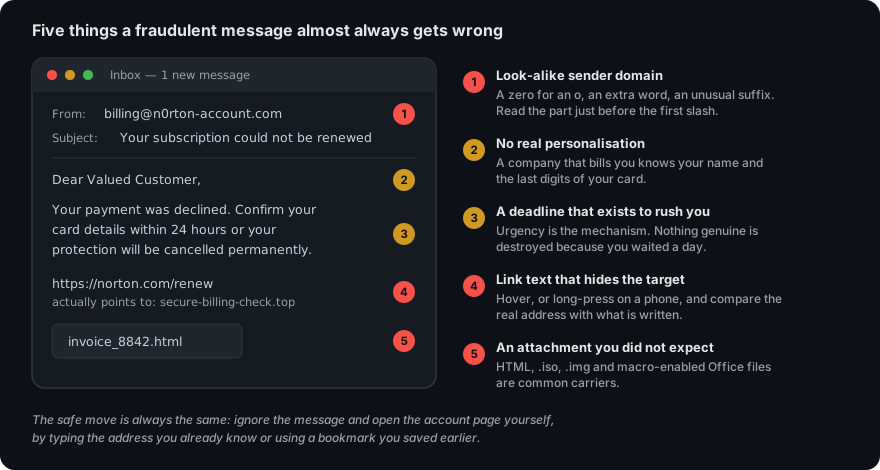
Note that the pretext in the example — a failed subscription renewal — is especially common precisely because security software is sold by subscription. If you get a message about your antivirus licence, do not use the link in it. Open the vendor’s site yourself, from a bookmark or by typing the address, and check the account page there.
Ransomware, and where it can still be stopped
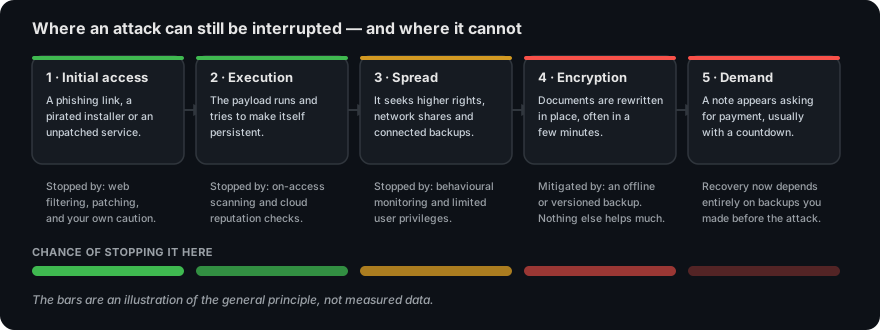
Ransomware gets disproportionate attention because the damage is so visible. What matters for a buyer is understanding at which point in the sequence software can still help, and at which point only preparation can.
The part no antivirus replaces
Once files are encrypted, recovery depends on a backup made before the attack, held somewhere the malware could not reach — an external drive that is normally unplugged, or a versioned cloud service. A backup drive left permanently connected is encrypted along with everything else. The cloud backup allowance included in the Norton tiers is genuinely useful here, but it is an allowance, not an unlimited archive; check the size against how much you actually need to protect.
Performance: what “light on resources” really means
Every vendor claims low system impact, so the claim carries no information on its own. What can be measured is the slowdown a product adds to specific operations: launching applications, copying files, installing software, browsing. AV-Comparatives publishes a periodic Performance Test that does exactly this, and AV-TEST scores performance as one of its three components.
Two practical points that matter more than the headline number. First, the heaviest moment for any suite is the first full scan after installation, when every file on the disk is read once; judging a product on that day is unfair to it. Second, on a machine with a mechanical hard disk rather than an SSD, the difference between a light and a heavy suite is far more noticeable than on modern hardware. We have not run our own performance benchmarks, and we do not publish numbers we have not measured.
Partner link. If you buy after following it we earn a commission from the retailer. It costs you nothing extra and does not change the price you are shown.
Reading independent lab results
Two European laboratories dominate consumer antivirus testing: AV-TEST, based in Magdeburg, Germany, and AV-Comparatives, based in Innsbruck, Austria. Both publish their methodology and their results publicly and free of charge, and both are worth ten minutes of your time before any purchase. SE Labs in the United Kingdom publishes comparable reports.
Norton’s consumer engine has appeared regularly in these tests for many years. We are deliberately not quoting a score here, for two reasons: results are published in rounds several times a year and any figure we printed would be stale within months, and the tested product name does not always map exactly onto the tier being sold. Read the current round yourself.
How to read a test round without being misled
- Check the date. A badge from three years ago describes software that has since been rewritten.
- Check which product was tested. Labs usually test the vendor’s flagship consumer suite; the entry tier shares the detection engine but not the extra features.
- Look at false positives, not just the protection rate. A product that blocks everything including your own software is not a good product.
- Prefer the full report to the award graphic. The graphic is designed to be reproduced in marketing; the report has the sample sizes.
What it does not do
An honest list matters more than a feature list, so here is what this tier will not do for you:
- It will not encrypt your connection. No VPN is included at this tier.
- It will not cover the rest of your household. The licence is for one device; phones, tablets and a second laptop are not covered.
- It will not watch for your data in breach dumps. Dark-web monitoring is a Norton 360 feature, and only in some regions.
- It will not manage what children can access. Parental controls are a Norton 360 Deluxe feature.
- It cannot undo encryption. Nothing in any consumer product reverses a completed ransomware attack. Backups do.
- It cannot make a bad decision safe. Approving a malicious installer, handing credentials to a convincing page or disabling protection to run a cracked program all defeat it.
Who it suits, and who should look higher
It is a reasonable fit if you have one main computer, you want mainstream malware protection with a password manager attached, and you are content with the browser and operating-system protections you already have for everything else.
Look at a higher tier or a different product if you need to cover several devices, if a VPN is one of your reasons for buying, if you want parental controls, or if you are protecting a business. Norton sells separate small-business products; the consumer tiers are licensed for personal use and the consumer AntiVirus Plus licence in particular covers a single device with no central management console. Check the licence terms if this applies to you.
Before you buy
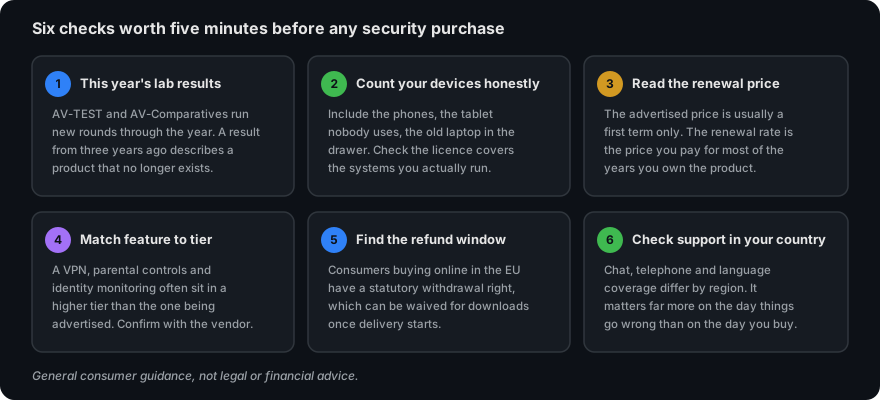
Three things are worth checking on the vendor’s own pages, because they change and because they are where buyers most often feel misled afterwards.
The renewal price. Consumer security software is routinely advertised at a discounted first-term price and renews at a higher standard rate. The renewal figure, not the introductory one, is the price you will pay for most of the years you own it. It is normally stated on the checkout page and in the subscription agreement.
Automatic renewal. Subscriptions generally renew automatically unless you turn that off in the account settings. Find that setting on the day you buy, not the day it charges you.
The refund terms. Consumers buying online in the EU have a statutory 14-day right of withdrawal, though for digital content delivered immediately that right can be waived at purchase — a box you may be asked to tick. Separately, the vendor may offer its own money-back period. These are two different things; read what you are agreeing to.
Partner link. If you buy after following it we earn a commission from the retailer. It costs you nothing extra and does not change the price you are shown.
Sources and method
This article is an explainer written from public documentation and from the published methodology of the independent testing laboratories. We did not receive a review licence, we did not benchmark the product ourselves, and we publish no scores, star ratings or reader testimonials — see our editorial policy for why.
- Gen Digital / Norton product and support documentation — for tier composition and licence terms: us.norton.com and the regional Norton store and support sites.
- AV-TEST Institute, Magdeburg — test methodology and current consumer rounds: av-test.org.
- AV-Comparatives, Innsbruck — Real-World Protection, Malware Protection and Performance test reports: av-comparatives.org.
- SE Labs — consumer endpoint protection reports: selabs.uk.
- ENISA Threat Landscape — for the general shape of the threat environment: enisa.europa.eu.
Precedence. Where anything in this article differs from the publisher’s own current documentation, pricing pages or subscription agreement, the publisher’s information prevails. Product details change without notice and we cannot guarantee that every statement here reflects the version on sale in your country today.
Trademarks. Norton, Norton AntiVirus, Norton 360 and LifeLock are trademarks of their respective owners. This website is independent: it is not affiliated with, endorsed by, sponsored by or otherwise connected to Gen Digital Inc., NortonLifeLock or any of their group companies. Trademarks are used here only to identify the product being discussed.
Illustrations. Every diagram on this page was drawn specifically for it as an original SVG file. No product screenshots, brand assets or stock photographs are used anywhere on this site.
Published 23 September 2026 by Anthony Martinez. Spotted an error? Tell us — corrections are logged and dated under our corrections policy.